AF02 Support

User Manual

Download the official AF02 User Manual for setup, connections, charging, safety and troubleshooting.

Download AF02 User Manual

Quick Setup

  1. 01

    Charge the keyboard before first use.

  2. 02

    Place the keyboard on a flat surface.

  3. 03

    Fully unfold the keyboard.

  4. 04

    Lock the latch in place.

  5. 05

    Turn on the keyboard.

  6. 06

    Select Bluetooth or 2.4G mode.

Connections & Device Switching

Choose Bluetooth or 2.4G, then complete every step before switching to another device.

Connection channels
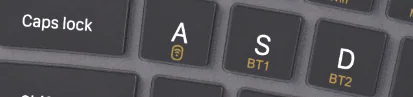
AF02 BT1 and BT2 connection keys
01

Bluetooth pairing

  1. 1

    Turn on the keyboard.

  2. 2

    Short press BT1 or BT2 to select a Bluetooth channel.

  3. 3

    Press and hold the selected Bluetooth channel key for 3 seconds to enter pairing mode.

  4. 4

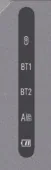
    When the Bluetooth status indicator blinks rapidly, open Bluetooth settings on the device.

  5. 5

    Select Aimarz Keyboard from the device list.

  6. 6

    If a pairing code appears, enter it on the keyboard and press Enter.

  7. 7

    Once connected, test typing.

If pairing fails, remove Aimarz Keyboard from the Bluetooth list and repeat the pairing process.
Status indicators
AF02 Bluetooth, 2.4G and battery status indicators
02

2.4G receiver pairing

  1. 1

    Turn on the keyboard.

  2. 2

    Short press the 2.4G channel key to select the 2.4G channel.

  3. 3

    Press and hold the 2.4G channel key for 3 seconds to enter pairing mode.

  4. 4

    When the 2.4G status indicator blinks rapidly, plug the 2.4G USB receiver into the device.

  5. 5

    If the device only has a Type-C port, connect the Type-C adapter first.

  6. 6

    Test typing after the device recognizes the keyboard.

If pairing fails, unplug the receiver, restart the keyboard, enter pairing mode again and reconnect the receiver.

Switch between paired devices

Complete pairing first. After changing channels, wait about 2 seconds before typing.

Device 1BT1

Short press BT1

Device 2BT2

Short press BT2

Device 32.4G

Short press 2.4G

Productivity & Media Shortcuts

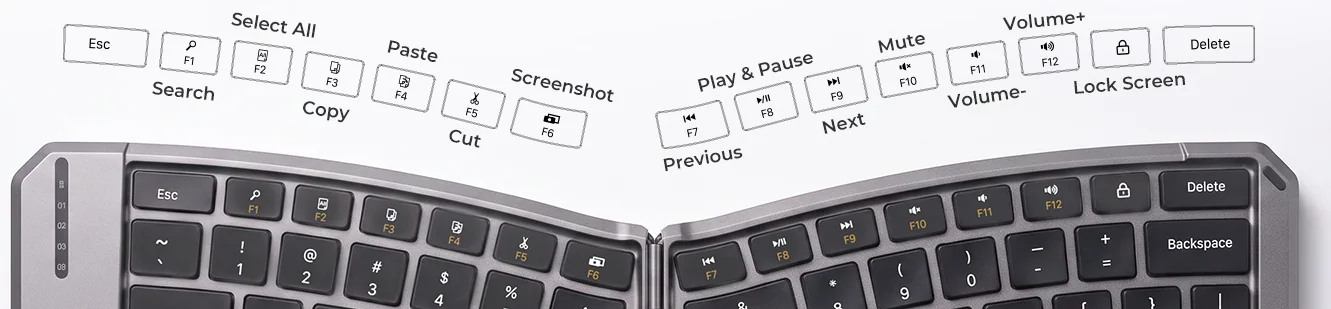
AF02 F1 through F12 productivity and media shortcut keys

Shortcut or standard F-key mode

Use Fn + Tab for shortcut functions and standard F1-F12 keys. Use Fn + Left Shift to check the battery level.

Troubleshooting

Confirm the keyboard is on, select the intended connection from Bluetooth, 2.4 GHz wireless, and repeat the matching pairing steps in the user manual.

Product FAQs

Contact Aimarz Support

Include your product model and a short description of the issue.

Email support@aimarz.com